
This article explains how to disable GPU and/or limit which GPUs SAFR users. This is assumed to be useful only for testing and not something that is likely needed by most users.
Argus or Virgo
Use Windows Device Manager and disable the Nvidia Device
Virgo
Set following on each feed:
- accelerator=cpu, gpu or auto
- accelerator.gpu-id attribute
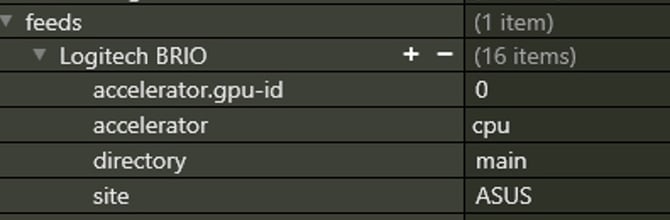
Windows
Disable the device in Windows Device Manager
or
File: C:\Program Files\RealNetworks\SAFR\face-service\config\config
HTFS will automatically use all available GPUs. You need to update the config file to tell it what GPUs you want it to use as follows:
#use_gpus=0,1 #list gpu ids to use or use alluse_gpus=all |
Switch All compute from GPU to CPU:
#use_pipeline=gpu,cpu,both #definition of pipline to use auto uses gpu if ause_pipline=auto |
Linux
Service (HTFS / Face Service)
HTFS will automatically use all available GPUs. You need to update the config file to tell it what GPUs you want it to use as follows:
File: /opt/RealNetworks/SAFR/face-service/config/config
#use_gpus=0,1 #list gpu ids to use or use alluse_gpus=all |
Switch All compute from GPU to CPU:
#use_pipeline=gpu,cpu,both #definition of pipline to use auto uses gpu if ause_pipline=auto |
Video Gateway
In case of virgo running in Docker you can update the compose file and bounce the virgo instance.
Run following commands:
cd /opt/RealNetworks/SAFR/virgo/app/docker-compose down |
Edit docker-compose.yml to add in the environment variable as follows:
docker-compose.yml file location:
- /opt/RealNetworks/SAFR/virgo/app
version: "3.6"services: virgo: image: safr_virgo:VIRGO_VERSION container_name: safr_virgo restart: on-failure pid: "host" environment: - NVIDIA_VISIBLE_DEVICES=0 volumes: - /opt/RealNetworks/SAFR/virgo/config/:/etc/virgo - VIRGO_PATH:/mnt/virgo-workspace# docker-compose up -d |
Restore docker with following command:
docker-compose up |